Installing the TiviMate IPTV Player on your device can significantly improve your IPTV viewing experience. Designed specifically for Android TV and TV boxes, TiviMate offers a smooth interface, powerful playlist management, and excellent performance for live TV and VOD streaming.
With the right IPTV credentials, users can stream thousands of live TV channels and on-demand content in high quality. Best of all, TiviMate is officially available on the Google Play Store, making installation quick and secure on Android TV devices.
What Is TiviMate IPTV Player?
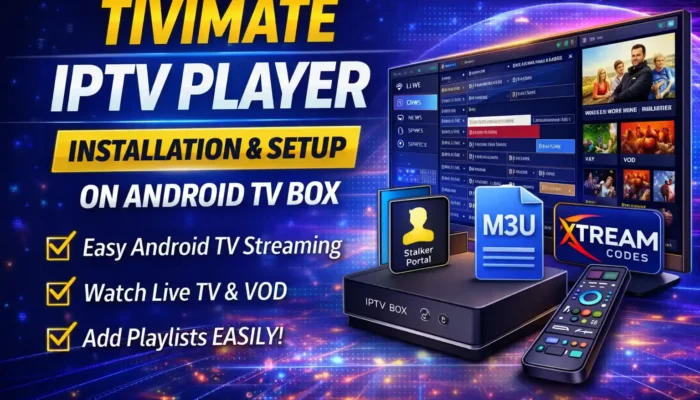
TiviMate is a premium IPTV player developed by AR Mobile Dev. It is designed to work with IPTV services that provide access through M3U playlists, Xtream Codes, or Stalker Portal credentials.
It’s important to understand that TiviMate does not provide IPTV channels on its own. Instead, it functions as a media player that allows users to stream IPTV content using credentials supplied by a third-party IPTV provider.
TiviMate is considered an advanced IPTV player because it supports:
- Electronic Program Guide (EPG)
- Playlist customization
- Channel grouping and favorites
- Xtream Codes and Stalker Portal login
- Smooth playback on Android TV
The app is available in both free and premium versions, with the premium version unlocking additional features.
Why TiviMate Is Best for Android TV Boxes
TiviMate is purpose-built for Android TV and TV boxes, which is why it performs better on large screens compared to many other IPTV players. The interface is optimized for remote control navigation, making it ideal for home entertainment systems.
If you are using an Android TV box, TiviMate is one of the best IPTV players available due to its stability and clean UI.
TiviMate M3U Playlist – What You Need to Know
Many users search for “TiviMate M3U playlist free download,” but it’s important to clarify that TiviMate does not come with pre-installed playlists.
To use TiviMate, you must have one of the following:
- M3U or M3U8 playlist URL
- Xtream Codes API (username, password, server URL)
- Stalker Portal / MAC-based IPTV credentials
Once you have valid IPTV details, TiviMate will load and organize your channels automatically.
How to Download TiviMate IPTV Player for Android TV Box
TiviMate is officially available on the Google Play Store, which is the safest way to download the app Or you can easily download the Tivimate pro from our link.
Steps to Download TiviMate:
- Open Google Play Store on your Android TV or TV box
- Search for TiviMate IPTV Player
- Install the app
- Launch TiviMate from your app drawer
Avoid downloading modified or unofficial APK files, as they may cause performance or security issues.
How to Set Up IPTV in TiviMate Player (Step-by-Step)
TiviMate does not include any channels by default. You must add your IPTV service manually.
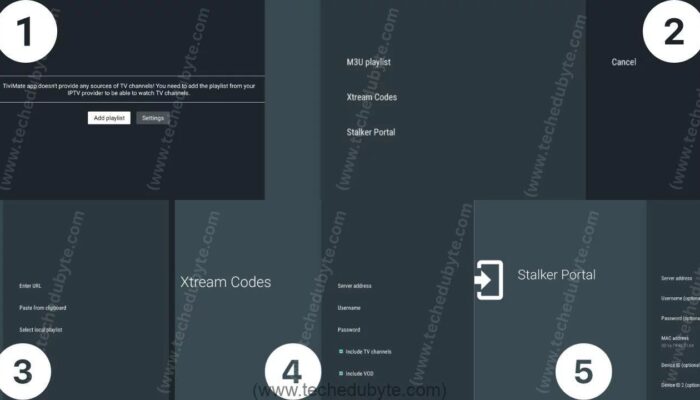
Step 1: Open TiviMate
After installation, open the TiviMate app.
Step 2: Add Playlist
Click on Add Playlist from the home screen.
Step 3: Choose Playlist Type
You will see three available options:
- M3U Playlist
- Xtream Codes Login
- Stalker Portal
Step 4: Enter IPTV Credentials
- For M3U Playlist: Paste your playlist URL and name it
- For Xtream Codes: Enter server URL, username, and password
- For Stalker Portal: Enter portal URL and MAC address
Step 5: Save and Load Channels
Once entered, save the playlist and allow TiviMate to load channels and EPG data.
That’s it—your IPTV setup is complete.
Why TiviMate Stands Out from Other IPTV Players
One major advantage of TiviMate is its support for Stalker Portal, which many IPTV players do not offer. This makes it a great choice for users whose IPTV providers rely on MAC-based authentication.
Additional advantages include:
- Fast channel switching
- Clean TV-style interface
- Advanced playlist management
- Excellent EPG support
Is TiviMate Suitable for Android Phones?
While TiviMate can run on Android phones, it is not optimized for small screens. Some users may experience UI scaling issues or lag.
For Android phones, alternative IPTV players such as:
- IPTV Smarters Pro
- OTT Navigator
- Televizo
may provide a better experience.
Conclusion
TiviMate IPTV Player is one of the best IPTV apps available for Android TV boxes. Its smooth performance, advanced features, and clean interface make it an excellent choice for watching IPTV on a big screen.
Although it requires external IPTV credentials, once set up correctly, TiviMate delivers a premium IPTV experience. If you primarily use an Android TV box, TiviMate is highly recommended.
If you found this guide helpful, feel free to share it with friends or family who use IPTV on Android TV devices.