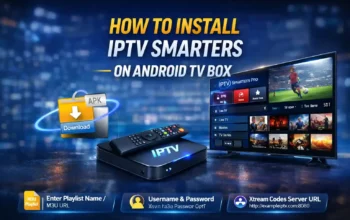
OTT Navigator Pro is one of the most popular IPTV players for Android devices thanks to its powerful features, clean interface, and ability to work with multiple playlist formats like M3U, Xtream Codes, MAC & portal systems. If you’re looking for a simple but complete setup guide for OTT Navigator Pro, this article will walk you through everything — from installation to configuration and tips for better performance.
What Is OTT Navigator Pro?
OTT Navigator Pro is an IPTV client app that lets you stream live TV, movies, and shows using playlist URLs or middleware-based IPTV services. The app does not provide content itself — instead, it works as a player that connects to various IPTV sources you already have access to.
Compared to other IPTV players, OTT Navigator Pro offers:
- A customizable user interface
- Support for multiple IPTV formats
- A built-in Electronic Program Guide (EPG)
- Smooth playback for HD streams
- Playlist and channels organization tools
It works on Android phones, Android TV boxes, and tablets.
Features of OTT Navigator Pro
Here are some of the key features that make OTT Navigator Pro stand out:
- Supports multiple playlist formats: You can add M3U playlists, Xtream Codes, MAC portals, and more.
- Electronic Program Guide (EPG): Helps you browse channels and upcoming shows.
- Favorites and categories: You can tag favorite channels and organize lists your way.
- Smooth playback: Works well even on modest Android devices.
- Supports external players: You can connect VLC, MX Player, or other video players for better performance if needed.
These features make OTT Navigator Pro a flexible choice whether you’re a beginner or advanced user.
Is OTT Navigator Pro Legal?
Yes — OTT Navigator Pro itself is legal to install and use because it doesn’t host any IPTV content. It functions strictly as a player.
However, the legality of the IPTV playlists or URLs you use depends on the source. Many countries consider certain IPTV streams illegal — especially those that offer copyrighted content without permission. If you live in a country with strict IPTV laws, using a VPN can help protect your privacy while streaming.
How to Download OTT Navigator Pro App
Before you set it up, you first need to download it safely. Here’s how:
- From the official source: OTT Navigator Pro can be downloaded from trusted app stores such as Google Play or the official app website.
- Third-party APK: If it’s not available in your region, you may use a trusted APK source. Only download from reputable sites to avoid fake apps.
- Install on Smart TV: If your TV doesn’t run Android natively, you can install Android TV boxes or sideload the app using tools like Downloader.
Make sure Unknown Sources is enabled in your Android settings before installing APKs from outside the app store.
How to Set Up OTT Navigator Pro (Step-by-Step)
Once the app is installed, setting it up is easy.
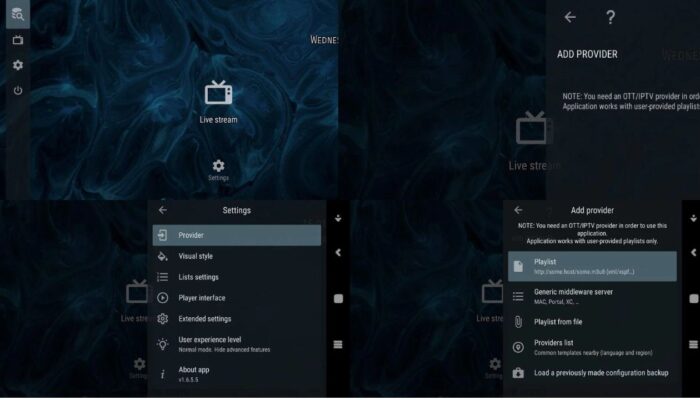
Step 1: Open the App
Launch OTT Navigator Pro on your device. On the first screen, you should see the main interface with no channels yet loaded.
Step 2: Go to Settings
Tap the Settings icon — usually located in the menu — to start configuring IPTV access.
Step 3: Add a Provider
Within settings, select Add Provider. Here you’ll see different setup options for playlist types like:
- Playlist from file – for local M3U files
- Playlist from URL – enter an IPTV playlist link
- Middleware server – for MAC portals, Stalker portals, or Xtream Codes formats
Step 4: Choose Your IPTV Type
Depending on what your IPTV provider gave you:
- M3U file: Select Playlist from File, then import the file from your device.
- M3U URL: Select Playlist and paste your M3U URL, then click Apply.
- MAC/Portal or Xtream Codes: Select Generic Middleware Server, then enter the URL and credentials your provider sent.
Step 5: Finalize Setup
Once the playlist or server credentials are applied, OTT Navigator will load the channels. You can then browse categories, live TV, and VOD.
Tips for a Better Viewing Experience
Here are a few tips to get the most out of OTT Navigator Pro:
Use Compatible URLs
Ensure your IPTV URLs are up-to-date and from reliable providers — expired URLs won’t load channels.
Enable EPG Guide
The Electronic Program Guide helps you see what’s playing now and next. Enable it if available with your playlist.
Sort Your Lists
Organize your channels into favorites or categories so you can access them quickly.
External Players
If your device struggles with buffering, try connecting an external player like VLC or MX Player for smoother playback.
Conclusion
OTT Navigator Pro is a versatile and powerful IPTV player that works across Android devices and TVs. It supports multiple setup formats — including M3U, Xtream Codes, and MAC portals — and offers advanced features like EPG, favorites, and customizable channel lists.
With the steps in this article, you should now have a clear understanding of how to install and configure OTT Navigator Pro in 2026, ensuring a stable and personalized IPTV experience.