Kodi is one of the most popular open-source media players used worldwide for streaming movies, TV shows, music, and live content. Thanks to its massive library of add-ons, Kodi has become a favorite platform for sports fans as well. Among the many sports add-ons available, Sports HD Kodi Addon stands out as a reliable option for watching live sports, match highlights, and replays from around the world.
Whether you enjoy football, basketball, cricket, UFC, or other sports, Sports HD makes it easy to stream your favorite events directly on Kodi in HD or SD quality.
What Is Kodi?
Kodi is a free and open-source media player designed to play and organize digital content from both local storage and online sources. It supports videos, music, podcasts, live TV, and IPTV playlists, making it an all-in-one entertainment solution.
One of Kodi’s biggest strengths is its flexibility. Users can customize the interface with different skins and install add-ons to access streaming services, live TV, and on-demand content. Kodi works on multiple platforms, including Windows, macOS, Linux, Android, iOS, and streaming devices. You can also watch M3U IPTV playlists on Kodi with the right add-ons.
Why Choose Sports HD Kodi Addon?
Sports HD is a popular third-party Kodi add-on specially designed for sports streaming. It offers free access to live matches and recorded content from various international sports leagues.
- How to Install Fishenzon Addon on Kodi to Watch Israeli TV Channels
- How to Install Samsung TV Plus Add-on on Kodi (Step-by-Step Guide)
Here are some key reasons why sports fans prefer Sports HD:
- Live sports streaming – Watch matches as they happen
- On-demand content – Highlights, replays, and post-match coverage
- Wide sports selection – Football, basketball, cricket, UFC, and more
- Multiple quality options – HD and SD streams based on internet speed
- Free access – No subscription required for most streams
How to Install Sports HD Addon on Kodi
Installing Sports HD on Kodi is simple if you follow the steps correctly.
Step 1: Open Kodi Settings
Launch the Kodi app and click on the Settings (gear icon).
Step 2: Go to Add-ons
Select Add-ons, then click on Install from zip file.
Step 3: Install the Repository
Choose the file named repository.bugatsinho-2.7 and wait for the installation confirmation.
Step 4: Install Sports HD Addon
After the repository is installed, follow these steps:
- Click Install from repository
- Select Bugatsinho Repository
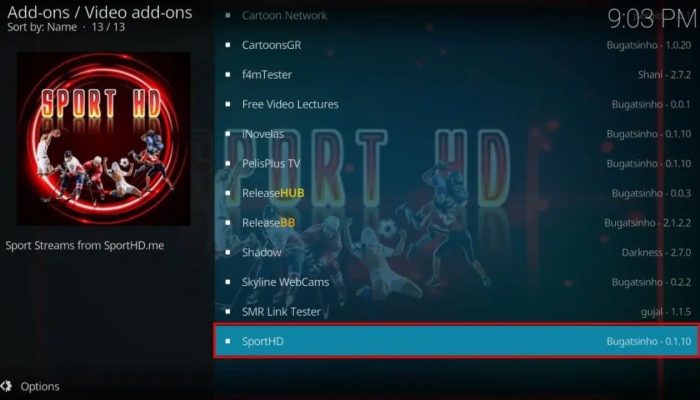
- Open Video Add-ons
- Choose Sports HD
- Click Install
Once installed, the add-on will be ready to use.
How to Use Sports HD on Kodi
- Open Kodi and go to Add-ons > Video Add-ons
- Launch Sports HD
- Browse available sections like Live Events, Highlights, or Replays
- Select your favorite sport or match
- Start streaming and enjoy
Conclusion
Sports HD Kodi Addon is an excellent choice for sports lovers who want to watch live matches and sports content without paying for subscriptions. With its wide sports coverage, simple interface, and free access, it remains one of the most popular sports add-ons for Kodi users.
By following this guide, you can easily install Sports HD on Kodi and start watching live sports anytime. For the best experience, use a stable internet connection and keep your Kodi app updated.
![How to Install Estuary Sparta Build on Kodi [Spanish]](https://stbemuiptvcodes.com/wp-content/uploads/2026/02/how-to-install-estuary-sparta-build-on-kodi-spanish-700x400.webp)