Kodi is one of the most powerful and flexible media players of all time, allowing users to stream content from around the world through add-ons. If you’re looking to watch Israeli TV channels on Kodi, the Fishenzon Addon is one of the best options available.
With the Fishenzon add-on, you can access a wide range of free Israeli TV channels, including news, entertainment, cultural programs, and sports. In this guide, we’ll walk you through the simplest and most effective way to install the Fishenzon Addon on Kodi and start streaming Israeli television content.
What Is the Fishenzon Addon?
The Fishenzon Addon is a third-party Kodi video add-on designed specifically for streaming popular Israeli TV channels. It’s a great solution for users who want to stay connected with Israeli news, shows, and live broadcasts from anywhere in the world.
Whether you’re an expatriate, a Hebrew content enthusiast, or someone interested in Israeli culture, Fishenzon makes it easy to enjoy Israeli television directly through Kodi.
What You Can Watch with Fishenzon
- Israeli news channels
- Entertainment and lifestyle programs
- Cultural and regional TV content
- Sports and live broadcasts
- Popular Israeli TV networks
Before You Begin: Important Requirements
Before installing the Fishenzon Addon, make sure the following requirements are met:
✔ Use the Latest Version of Kodi
Always keep Kodi updated to ensure compatibility, better performance, and security.
✔ Use a VPN (Recommended)
Although the Fishenzon Addon itself is legal, a VPN helps:
- Protect your online privacy
- Bypass geo-restrictions
- Avoid ISP throttling
✔ Enable Third-Party Add-ons
Since Fishenzon is not an official Kodi add-on, you’ll need to allow installations from unknown sources.
Step 1: Enable Unknown Sources in Kodi
- Open Kodi
- Click the Settings (gear icon)
- Go to System
- Select Add-ons
- Enable Unknown Sources
- Click Yes when the warning message appears
Step 2: Download the Fishenzon Repository
Download the Fishenzon repository ZIP file (e.g., repository.Fishenzon-1.0.3.zip) from a trusted source.
Step 3: Install the Fishenzon Repository
- Go back to the Kodi home screen
- Click Add-ons
- Select the Package Installer icon (top-left corner)
- Choose Install from zip file
- Locate and select the Fishenzon repository ZIP
- Wait for the installation confirmation message
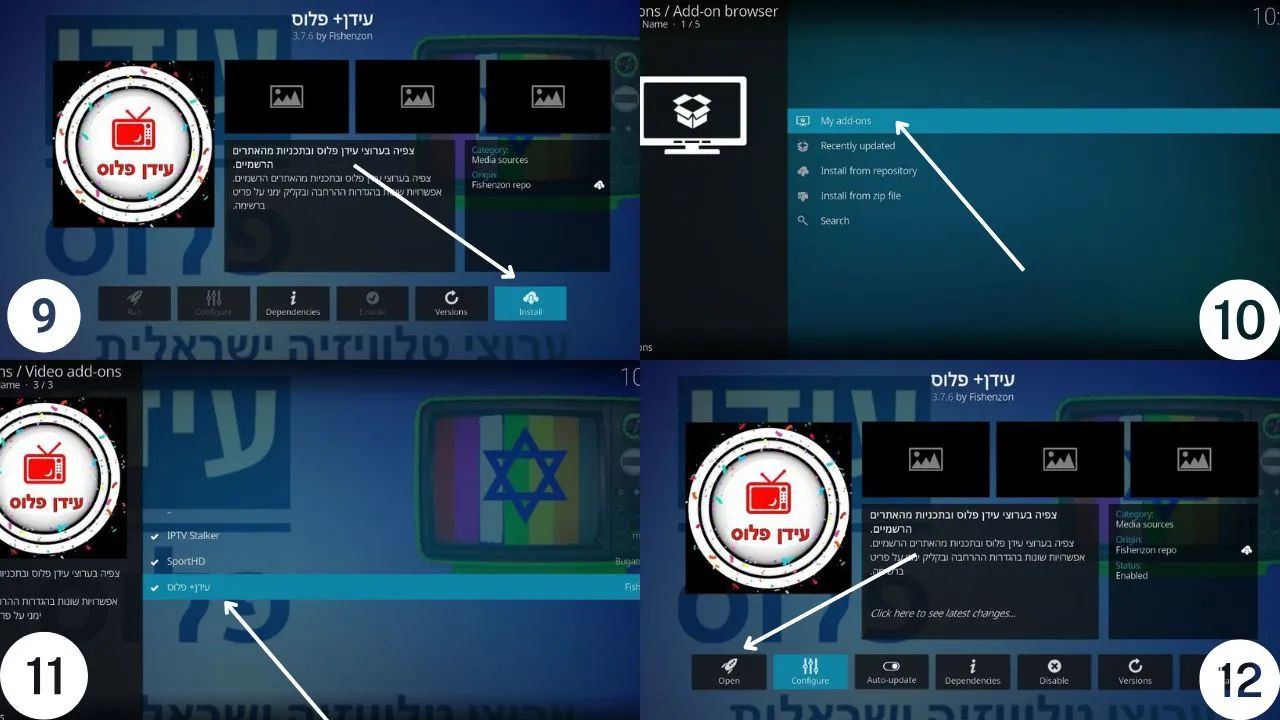
Step 4: Install the Fishenzon Addon
- From the Package Installer, click Install from repository
- Select the Fishenzon (Israeli TV) repository
- Click Video Add-ons
- Choose Fishenzon Addon
- Click Install
- Wait for the add-on installation to finish
Step 5: Start Watching Israeli TV Channels
- Go back to the Kodi home screen
- Open Add-ons
- Launch the Fishenzon Addon
- Browse the available Israeli TV channels
- Select a channel and start streaming
Final Thoughts
The Fishenzon Addon for Kodi makes it easy to watch Israeli TV channels without subscriptions or complicated setups. Whether you’re missing home or exploring Israeli culture, this add-on offers a convenient way to access live TV and entertainment.
By following the steps above, you can install Fishenzon on Kodi in just a few minutes and enjoy a smooth streaming experience.